Your Google Sheet, sorted every time a row is added
KeepSorted is a Google Sheets add-on that re-sorts your real rows (not a SORT() copy) whenever someone types a new row or changes a value. Pick the columns once; no script to maintain. Prefer code? Our free Apps Script how-to is below.
KeepSorted is built and in testing; it is not in the Google Workspace Marketplace yet. One email when you can install it.
See it work
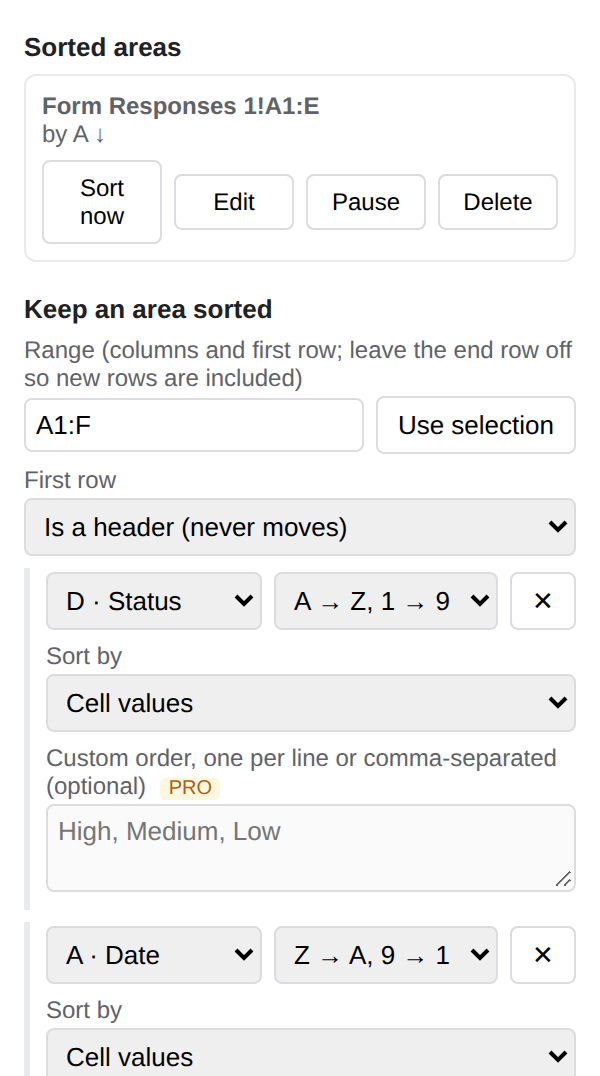
Example: sorted by Status (A to Z), then Date (newest first). The header row stays put. The "after" table is the output of KeepSorted's sort code run on the "before" rows.
| Date | Name | Company | Status |
|---|---|---|---|
| 2026-10-12 | Dana Levi | Northwind | Won |
| 2026-10-30 | Omar Haddad | Bluefin | Open |
| 2026-10-05 | Mia Chen | Acme | Lost |
| 2026-10-21 | Sam Ortiz | Globex | Open |
| 2026-10-28 | Ana Costa | Initech | Won |
| 2026-11-01 | Lee Park | Umbrella | Open |
| Date | Name | Company | Status |
|---|---|---|---|
| 2026-10-05 | Mia Chen | Acme | Lost |
| 2026-11-01 | Lee Park | Umbrella | Open |
| 2026-10-30 | Omar Haddad | Bluefin | Open |
| 2026-10-21 | Sam Ortiz | Globex | Open |
| 2026-10-28 | Ana Costa | Initech | Won |
| 2026-10-12 | Dana Levi | Northwind | Won |
Limits, honestly
What KeepSorted does not do, or does only with a catch.
How many rows can it sort?
Up to 20,000 rows per sort area. Past that KeepSorted sorts nothing and tells you in the sidebar to end the range earlier (for example A1:F20000), because a very long sort can run into Google's time limit for automatic scripts. Several areas on one tab (Pro) each get their own 20,000.
What about formulas that point at other rows?
A sort moves a row's formulas with it, as Google's own Sort range does. A formula that points at a cell in the same row keeps working. A formula that points at a different row (for example =B3+1, or a running total that adds the row above) can end up pointing at a different row after the sort, because the reference is relative. Use absolute references (=$B$3) or lookups (XLOOKUP, INDEX/MATCH on a key) in a sorted area, or keep those formulas outside it.
Frozen rows, filters, protected cells and merged cells?
Frozen rows stay on top, however many you freeze. Merged cells inside the sort area stop the sort (Google refuses it); the sidebar says to unmerge them. A protected range you cannot edit stops it too, with a message. A filter view or the basic filter being on is not something we have checked in a real Sheet yet.
Which order does it use for mixed columns?
Google Sheets' own: numbers and dates first, then text (not case sensitive), then TRUE/FALSE, with blank cells always last. Checkbox columns sort unchecked before checked. Blank rows in the middle of an area move to its end; to keep tables separated by blank rows apart, use Pro's stacked tables.
Does it keep working if I rename the tab?
Yes, the rule follows the tab, not its name. If you delete the tab the rule stays but does nothing.
Who triggers an automatic sort?
Free: an edit by someone who has KeepSorted installed. Edits by other people, Google Forms answers, imports and scripts need Pro (installable triggers plus an hourly check). Google only lets add-ons run a time trigger once an hour.
What KeepSorted does
Sorts the data itself
Rows move like a normal Data > Sort range: formatting and formulas travel with them, the header row stays on top, blanks go last. Nothing is written when the sheet is already in order.
Free that is really free
One auto-sort rule per tab with up to 2 sort columns, for as long as you like. No trial clock.
Pro for messy real sheets
Stacked tables on one tab sorted separately, custom order (High > Medium > Low), up to 5 columns, and rows from Google Forms or other editors sorted too.
Pricing
Free
- 1 auto-sort rule per tab, up to 2 sort columns, sorts on every edit made by people who have the add-on
- Header row kept on top, blanks last, Sort now button
Pro
- Up to 10 areas per tab, including stacked tables split at blank rows, and up to 5 sort columns
- Custom order (e.g. High > Medium > Low) for status and priority columns
- Sorts rows from Google Forms, other editors and imports (Forms/edit triggers plus an hourly check)
Secure checkout by Polar. Your licence key arrives by email right after; paste it in the add-on. Cancel anytime.
Pro opens with the store listing: join the Pro list and we email you the day it is on sale.
Rather paste a script?
For one sheet and one sort column, a short Apps Script onEdit function does the job for free. Our guide How to auto-sort a Google Sheet when a new row is added has the copy-paste script, the Google Forms version, and the catches to know about. More free guides: auto-sort by date, newest first (Google Forms too), auto-sort by multiple columns when data changes, StaySorted alternative: an honest comparison, auto-sort alphabetically, an auto sort script generator for your own range, and a sort formula generator (SORT, SORTN, QUERY) for a sorted copy.